
Freelancers do not have teams. They are the writer, designer, developer, accountant, and project manager all at once. AI tools in 2026 make this sustainable. The right stack can cut administrative work in half, speed up deliverables, and improve client communication without hiring anyone.
This guide builds complete AI tool stacks for five freelancer specialties: writers, designers, developers, consultants, and generalists. Each stack includes the exact tools, what they do, and the total monthly cost.
Key Takeaways
- The average freelancer actively uses only 42 percent of their paid AI subscriptions. Focus on 2 to 3 core tools, not a dozen.
- A complete freelancer AI stack costs $40 to $80 per month for most specialties.
- The highest-ROI tools are meeting transcription, first-draft writing assistance, and proposal generation.
- Free tiers from ChatGPT, Claude, and Grammarly cover basic needs for freelancers just starting out.
- The best stack combines one general AI assistant, one specialty tool, and one productivity platform.
What Every Freelancer Needs
Regardless of specialty, every freelancer faces the same five categories of work:
Client communication: Emails, proposals, contracts, and follow-ups. Deliverables: Writing, code, design, analysis, or advice. Research: Background reading, competitive analysis, fact-checking. Admin: Invoicing, scheduling, tracking, project management. Learning: Staying current, picking up new skills, experimenting.
The ideal AI stack covers all five categories without redundancy. Most freelancers need one tool per category, not multiple tools doing the same job.
The Core Stack: Tools Every Freelancer Should Consider
Before specialty-specific recommendations, here are the foundational tools that fit almost any freelancer:
1. General AI Assistant
ChatGPT Plus at $20 per month or Claude Pro at $20 per month. Both handle writing, coding help, research, and client communication. ChatGPT is better for coding and image generation. Claude excels at long documents and nuanced reasoning.
2. Writing and Editing
Grammarly Premium at $12 per month catches grammar errors, adjusts tone, and improves clarity. It is more reliable than general AI assistants for proofreading.
3. Meeting and Call Management
Fireflies.ai or Otter.ai at $10 to $20 per month transcribes client calls, generates summaries, and extracts action items. This has the highest immediate time return of any freelancer tool.
4. Project and Knowledge Management
Notion with AI at $10 per month organizes projects, documents, and client information. The AI features summarize notes and generate task lists.
5. Design and Visuals
Canva Pro at $15 per month handles social graphics, presentations, proposals, and client-facing documents. Non-designers can produce professional output in minutes.
Specialty-Specific Stacks
Writers and Content Freelancers
Writers spend most of their time researching, drafting, editing, and managing client feedback.
| Tool | Cost | Purpose |
|---|---|---|
| Claude Pro | $20/mo | Long-form drafting, research synthesis, editing |
| Perplexity Pro | $20/mo | Research with cited sources |
| Grammarly Premium | $12/mo | Proofreading and tone adjustment |
| Notion AI | $10/mo | Project organization and note summaries |
| Total | $62/mo |
Why this stack: Claude handles the heavy lifting of first drafts. Perplexity replaces hours of manual research with cited, current information. Grammarly polishes the final output. Notion keeps projects organized.
Free alternative: ChatGPT free tier + Grammarly free + Notion free = $0. Covers 70 percent of paid functionality for new freelancers.
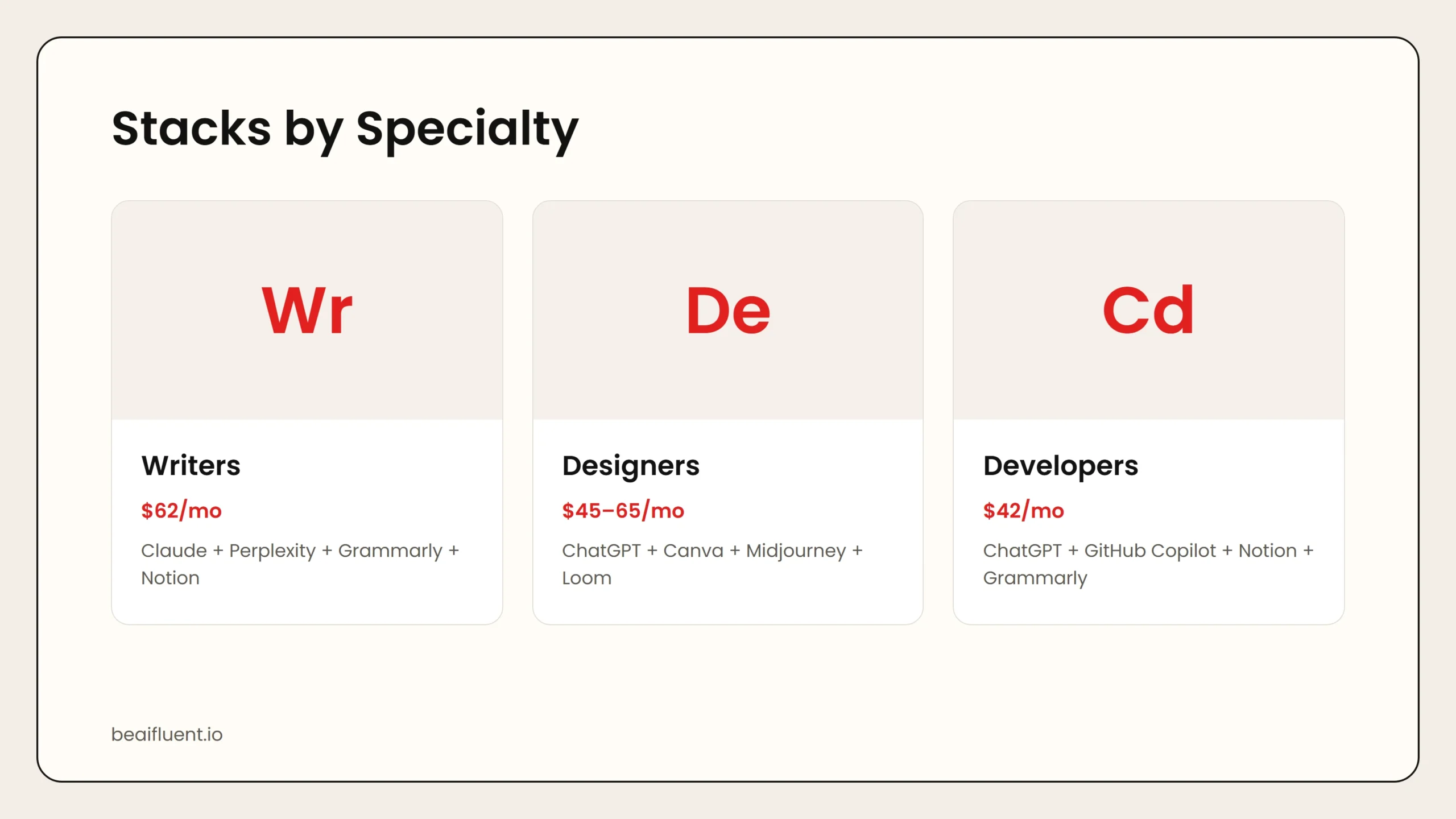 Caption: Writers need research and drafting tools. Designers need visual production. Developers need coding assistance. Consultants need research and meeting management. Generalists need the broadest coverage.
Designers and Creative Freelancers
Designers need tools for ideation, production, client presentations, and asset management.
| Tool | Cost | Purpose |
|---|---|---|
| ChatGPT Plus | $20/mo | Copywriting for designs, client communication |
| Canva Pro | $15/mo | Social graphics, presentations, proposals |
| Midjourney or Adobe Firefly | $10–$30/mo | AI image generation for concepts and assets |
| Loom (free) | $0 | Async video feedback for client reviews |
| Total | $45–$65/mo |
Why this stack: Canva Pro covers 80 to 90 percent of non-designer visual needs. Midjourney or Firefly generates concept art and mood boards. ChatGPT writes copy that accompanies designs. Loom replaces endless revision emails with video explanations.
Developers and Technical Freelancers
Developers need code assistance, documentation, debugging, and client communication.
| Tool | Cost | Purpose |
|---|---|---|
| ChatGPT Plus | $20/mo | Code explanation, debugging, documentation |
| GitHub Copilot | $10/mo | Inline code suggestions and completion |
| Notion (free) | $0 | Project documentation and knowledge base |
| Grammarly Premium | $12/mo | Technical writing and client communication |
| Total | $42/mo |
Why this stack: GitHub Copilot speeds up coding with intelligent suggestions. ChatGPT explains unfamiliar code and generates documentation. Notion organizes project specs and client requirements. Grammarly ensures client emails are clear and professional.
Free alternative: ChatGPT free + Codeium free + Notion free = $0. Codeium offers solid code completion at no cost.
Consultants and Advisors
Consultants spend their time researching, analyzing, writing reports, and managing client relationships.
| Tool | Cost | Purpose |
|---|---|---|
| Claude Pro | $20/mo | Report writing, analysis, proposal generation |
| Perplexity Pro | $20/mo | Deep research with real-time sources |
| Fireflies.ai | $10/mo | Call transcription and action item extraction |
| Notion AI | $10/mo | Client project management and documentation |
| Total | $60/mo |
Why this stack: Perplexity gathers current market data and competitive intelligence. Claude synthesizes findings into structured reports and recommendations. Fireflies captures every detail from client calls. Notion organizes deliverables across multiple clients.
Generalists and Virtual Assistants
Generalists need the broadest coverage because their work changes daily.
| Tool | Cost | Purpose |
|---|---|---|
| ChatGPT Plus | $20/mo | General writing, research, problem-solving |
| Canva Pro | $15/mo | Graphics, presentations, social content |
| Grammarly Premium | $12/mo | Editing and tone adjustment |
| Otter.ai Pro | $10/mo | Meeting transcription |
| Notion AI | $10/mo | Project and task management |
| Total | $67/mo |
Why this stack: ChatGPT handles the widest range of tasks. Canva covers visual needs. Grammarly polishes everything. Otter.ai and Notion manage the operational side.
Side-by-Side Cost Comparison
| Specialty | Core Stack Cost | Free Alternative Available? |
|---|---|---|
| Writers | $62/mo | Yes ($0) |
| Designers | $45–$65/mo | Partial ($15–$30) |
| Developers | $42/mo | Yes ($0) |
| Consultants | $60/mo | Partial ($20) |
| Generalists | $67/mo | Partial ($20) |
Most freelancers see positive ROI within the first month. If an AI stack saves 5 hours per week and your hourly rate is $75, the tools pay for themselves three times over.
How to Build Your Stack Step by Step
Follow this process to avoid overspending on tools you will not use:
- Track your time for one week. Identify which tasks consume the most hours.
- Pick your biggest time drain. Research one tool that solves that specific problem.
- Start with free tiers. Test for two weeks before paying.
- Add one tool per month. Resist the urge to subscribe to everything at once.
- Cancel what you do not use. Audit subscriptions quarterly.
Tip: The average freelancer actively uses only 42 percent of their paid AI subscriptions. Start small. Add tools only when you have a clear, recurring need.
Common Mistakes to Avoid
Even experienced freelancers make these errors when building an AI stack:
- Subscribing to too many tools at once. Overlap is common. ChatGPT and Claude cover similar ground. Pick one.
- Ignoring free tiers. Many freelancers pay for Pro features they never use. Free tiers often suffice for months.
- Buying tools before identifying the problem. A tool without a workflow is just another subscription.
- Forgetting about client confidentiality. Some AI tools train on your inputs. Check privacy policies before uploading client data.
- Not measuring time savings. If you cannot quantify the benefit, you cannot justify the cost.
Frequently Asked Questions
How much should a freelancer spend on AI tools per month?
Most freelancers get excellent results spending $40 to $80 per month. Free tiers cover basic needs. Premium plans become worthwhile when you have consistent, high-volume work.
What is the single best AI tool for freelancers?
A general AI assistant like ChatGPT Plus or Claude Pro. It handles the highest variety of tasks and delivers the most versatile value.
Can I deduct AI tool subscriptions on my taxes?
In most jurisdictions, software subscriptions used for business purposes are tax-deductible. Consult a tax professional for advice specific to your location.
Are free AI tools good enough for freelancers?
Often yes. ChatGPT free, Grammarly free, Canva free, and Notion free handle a surprising amount of work. Upgrade when free limits become a genuine bottleneck.
Which tool saves freelancers the most time?
Meeting transcription tools like Fireflies or Otter.ai have the highest immediate return. A 60-minute client call produces a full summary in seconds, eliminating manual note-taking.
Sources
If you are new to freelancing with AI, our guide on how to start using AI as a complete beginner covers the basics. For free options across categories, see best free AI tools.