
Most AI chatbots answer questions using only what they learned during training. That knowledge has a cutoff date and knows nothing about your private files, company policies, or recent research. RAG changes this. It lets AI pull facts directly from your documents before answering, making responses more accurate, current, and relevant to your specific situation.
In this guide, we explain what RAG is, how it works, why it reduces AI hallucinations, and how beginners can start using it.
Key Takeaways
- RAG stands for Retrieval-Augmented Generation. It combines document search with AI text generation.
- Instead of guessing from training data, RAG reads your documents first and then answers.
- RAG reduces AI hallucinations because answers are grounded in real source material.
- You can use RAG with company files, legal documents, research papers, and personal notes.
- Beginners can start with tools like NotebookLM, Perplexity Spaces, or open-source platforms like LangChain.
The Problem: AI Does Not Know Your Documents
ChatGPT, Claude, and Gemini are trained on massive public datasets. They know history, science, literature, and popular culture. However, they do not know:
- Your company’s internal procedures.
- The research paper you downloaded yesterday.
- Your client’s contract details.
- Your personal notes from last quarter.
When you ask about these topics, a standard AI chatbot must guess. Sometimes it guesses well. Often it invents facts, cites non-existent sources, or gives outdated advice. This is called hallucination, and it is one of the biggest risks in using AI for professional work.
For more on why AI makes mistakes, see our guide on what are AI hallucinations and how to spot them.
What Is RAG?
RAG stands for Retrieval-Augmented Generation. It is a technique that gives AI access to specific documents before it writes an answer.
Here is the simple version:
- You upload a set of documents.
- The system breaks those documents into small chunks and indexes them.
- When you ask a question, the system searches the index for the most relevant chunks.
- It feeds those chunks to the AI model along with your question.
- The AI answers using both its general knowledge and the specific facts from your documents.
Think of it like an open-book exam. Instead of memorizing everything, the AI is allowed to look up the answer in your documents before responding.
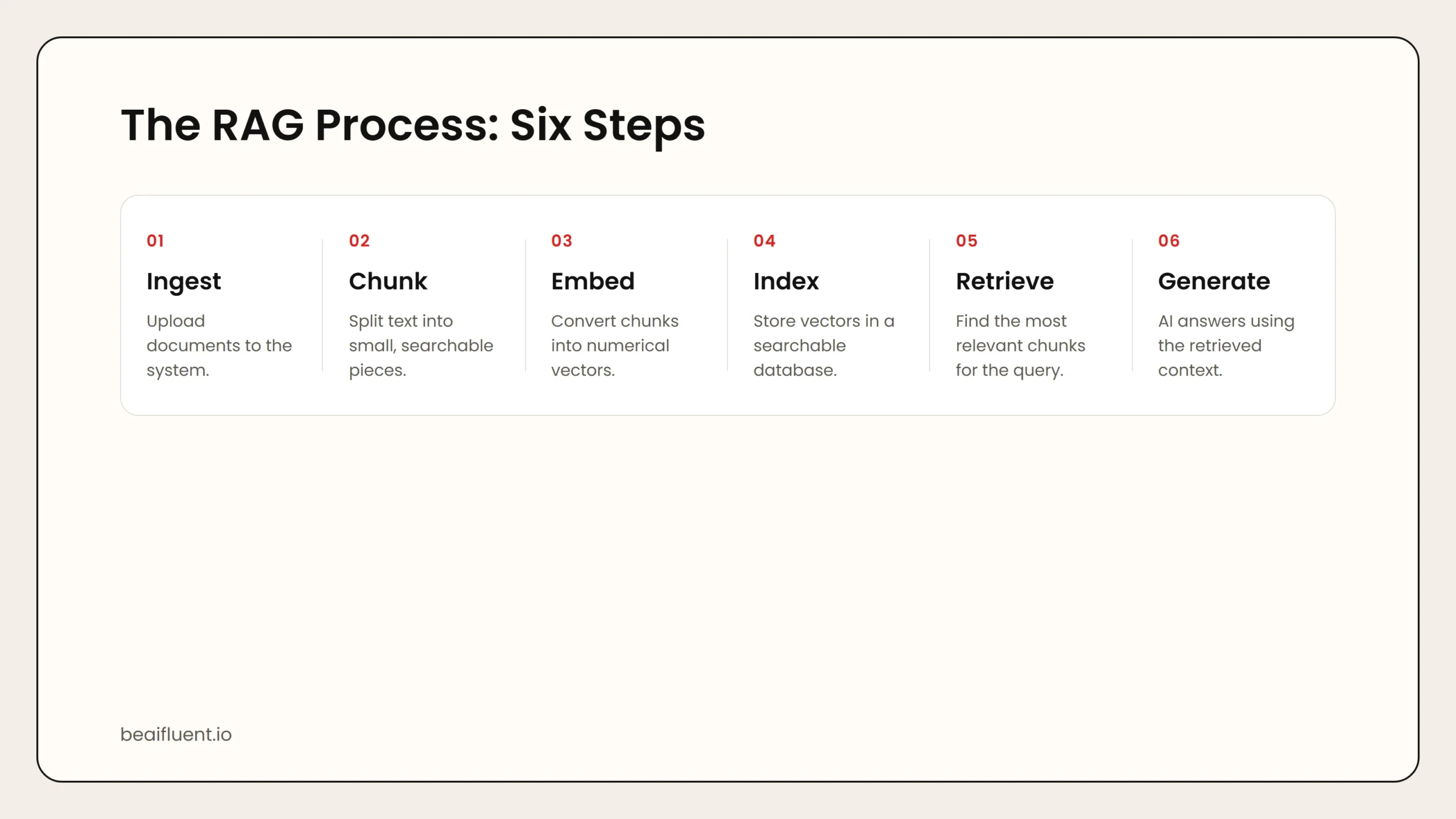 Caption: RAG breaks documents into chunks, indexes them, retrieves the most relevant pieces, and feeds them to the AI for a grounded answer.
How RAG Works: A Step-by-Step Breakdown
RAG sounds complex, but the process follows a clear pattern. Here is what happens behind the scenes:
Step 1: Document Ingestion
Your documents are uploaded to the RAG system. These can be PDFs, Word files, web pages, spreadsheets, or plain text. The system reads each file and converts it into raw text.
Step 2: Chunking
Long documents are split into smaller pieces called chunks. A chunk might be one paragraph, one section, or a few sentences. Smaller chunks make search more precise.
Step 3: Embedding
Each chunk is converted into a numerical vector called an embedding. This vector captures the meaning of the text. Two chunks about similar topics will have similar vectors, even if they use different words.
Step 4: Indexing
All the vectors are stored in a vector database. This database is optimized for fast similarity search.
Step 5: Retrieval
When you ask a question, the system converts your question into a vector too. It then searches the database for the chunks whose vectors are most similar to your question. These chunks are the most likely to contain the answer.
Step 6: Generation
The retrieved chunks are combined with your original question into a single prompt. The AI model reads this prompt and generates an answer that references the specific document content.
Example: You upload a 50-page employee handbook. You ask, “What is the remote work policy?” The RAG system finds the relevant page, extracts the policy text, and the AI answers: “According to the handbook section 4.2, employees may work remotely up to three days per week with manager approval.”
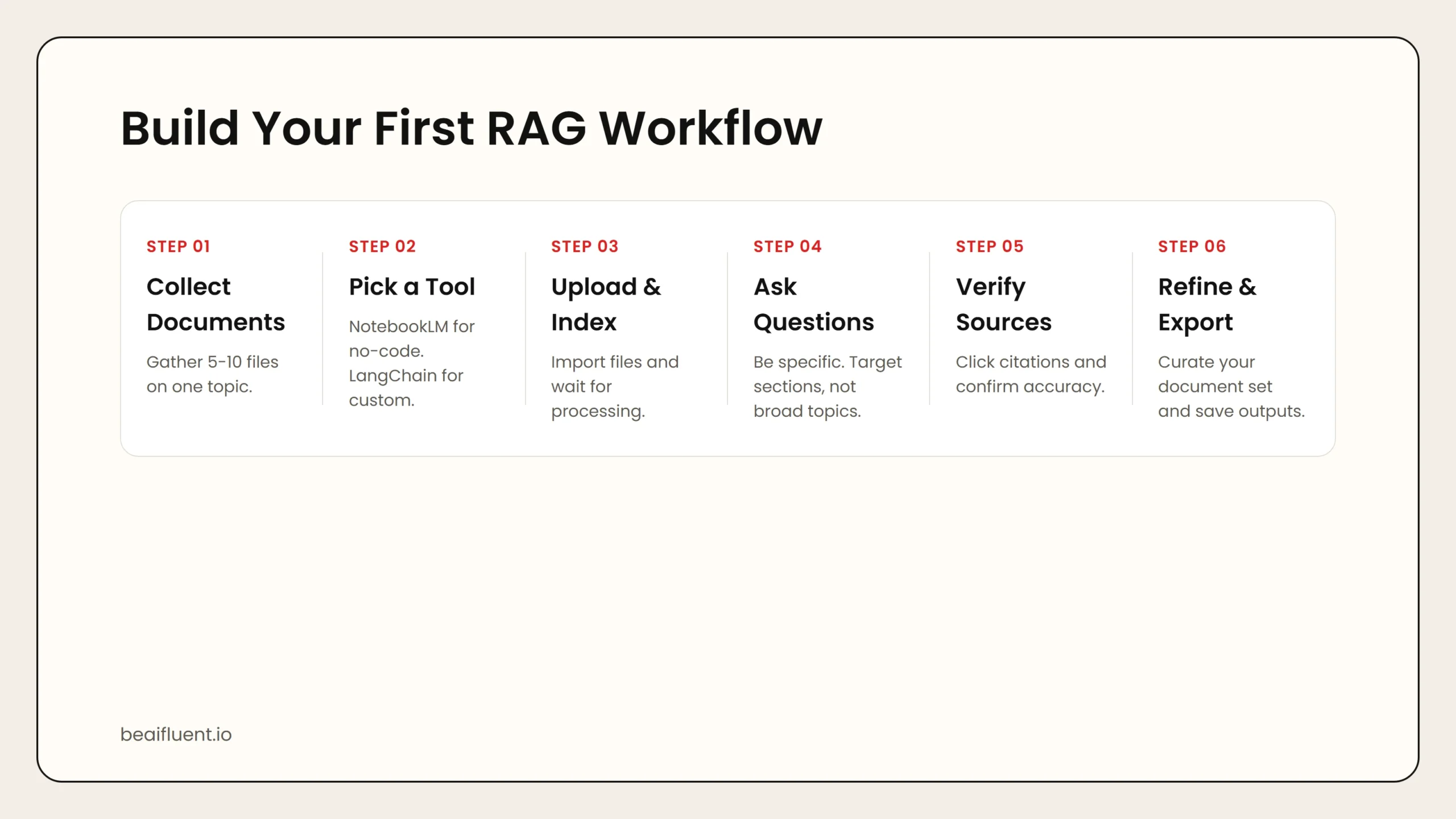 Caption: Collect documents, pick a tool, upload and index, ask specific questions, verify sources, then refine and export.
Why RAG Matters
RAG is not just a technical trick. It solves real problems that affect anyone using AI for work.
More accurate answers:
- Because the AI reads your actual documents, it is far less likely to invent facts.
- Answers cite specific source material, so you can verify them.
Up-to-date information:
- Training data has a cutoff date. RAG uses your current documents, so answers reflect the latest information.
Privacy control:
- You choose which documents the AI can see. Sensitive files stay private if you do not upload them.
- Some RAG setups run entirely on your own computer.
Domain expertise:
- General AI models know a little about everything. RAG lets them know a lot about your specific field, company, or project.
Cost efficiency:
- Fine-tuning a model on your data is expensive and technical. RAG achieves similar results without retraining anything.
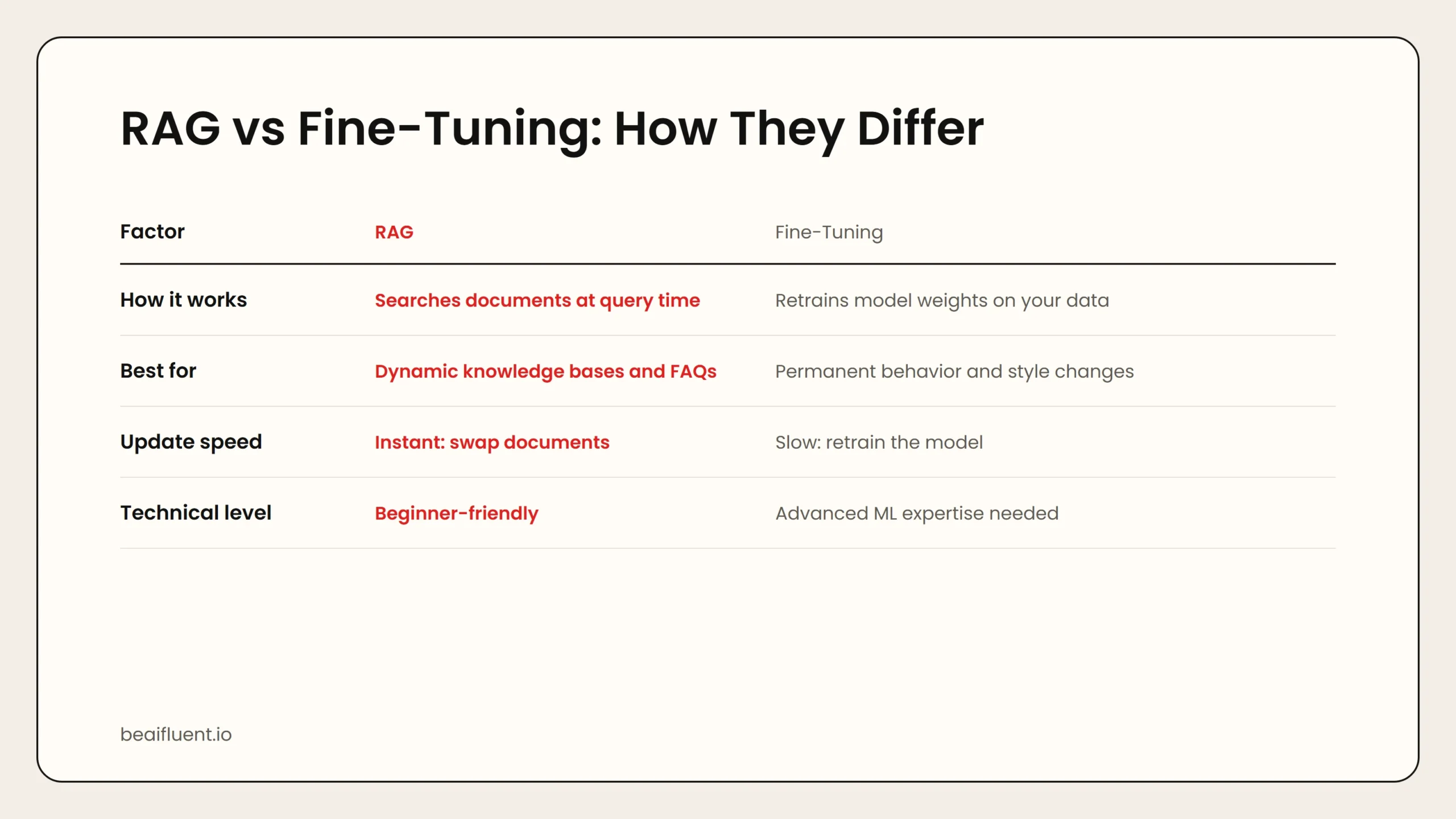 Caption: RAG searches documents at query time. Fine-tuning permanently retrains the model. Most beginners should start with RAG.
RAG vs Fine-Tuning: What Is the Difference?
Beginners often confuse RAG with fine-tuning. They are different approaches to the same goal: making AI smarter about your specific content.
| Approach | How It Works | Best For | Technical Level |
|---|---|---|---|
| RAG | Searches documents at query time | Dynamic knowledge bases, FAQs, research | Beginner-friendly |
| Fine-tuning | Retrains model weights on your data | Permanent behavior changes, style matching | Advanced |
RAG is like giving the AI a library card. It looks up answers when needed.
Fine-tuning is like sending the AI to school. It permanently changes what the model knows.
Most beginners and teams should start with RAG. It is faster to set up, easier to update, and does not require machine learning expertise.
Real-World Use Cases for RAG
RAG is already being used across many industries. Here are practical examples:
Legal and compliance:
- Lawyers upload contracts and case files, then ask targeted questions about clauses and obligations.
- Compliance teams query policy documents to check regulatory alignment.
Healthcare and research:
- Researchers upload medical papers and ask for summaries of findings across studies.
- Clinicians query hospital guidelines for protocol details.
Customer support:
- Support teams upload product manuals and FAQs. The AI answers customer questions using the exact official language.
Sales and marketing:
- Sales teams upload competitive battle cards and pitch decks. The AI generates tailored responses for prospect questions.
Personal knowledge management:
- Students and professionals upload notes, articles, and books. The AI becomes a searchable research assistant.
Tools That Make RAG Accessible
You do not need to build RAG from scratch. Several tools offer RAG functionality with minimal setup.
NotebookLM by Google
NotebookLM lets you upload documents and then ask questions about them. It generates summaries, timelines, and even podcast-style audio discussions based on your sources.
Best for: Students, researchers, and writers who want a simple, free way to chat with documents.
Limitation: Requires a Google account and works in the cloud.
Perplexity Spaces
Perplexity Spaces lets you create topic-specific search spaces. You add sources, and Perplexity answers questions using only those sources while still citing web results where helpful.
Best for: Professionals who want a hybrid of web search and document-grounded answers.
Custom RAG with LangChain or LlamaIndex
Developers and technical users can build custom RAG pipelines using open-source frameworks. These tools handle chunking, embedding, and retrieval, letting you connect any model to any document set.
Best for: Engineers, data scientists, and teams that need full control over the RAG pipeline.
How to Build Your First RAG Workflow
If you want to try RAG without coding, follow this beginner workflow:
- Collect your documents. Gather 5–10 files on a single topic. PDFs, Word docs, and web pages all work.
- Pick a tool. Start with NotebookLM for a no-code experience.
- Upload your files. Import them into the tool and wait for indexing to complete.
- Ask specific questions. Instead of “Tell me about this,” ask “What does section 3 say about pricing?” or “Compare the two approaches described in chapters 2 and 5.”
- Verify the answers. Click through to the source citations and confirm the AI interpreted the document correctly.
- Refine your document set. Add more files for broader coverage, or remove outdated ones to improve accuracy.
- Export useful outputs. Save summaries, Q&A pairs, or outlines for your team.
Tip: The quality of RAG answers depends heavily on the quality of your documents. Well-structured, clearly written sources produce far better results than scanned PDFs with messy formatting.
Common RAG Mistakes to Avoid
Even with the right tools, RAG can underperform if you make these mistakes:
- Uploading low-quality documents. Scanned images, broken PDFs, and messy formatting confuse the chunking process.
- Asking vague questions. Specific questions retrieve better chunks than broad ones.
- Expecting perfect citations. AI can misattribute a fact to the wrong document. Always verify against the source.
- Ignoring context limits. Very long documents or too many files can overwhelm the retrieval system. Curate your document set.
- Treating RAG as fully private. Cloud-based RAG tools process your documents on external servers. For true privacy, run a local RAG setup.
Frequently Asked Questions
What does RAG stand for?
RAG stands for Retrieval-Augmented Generation. It is a method that lets AI search documents before generating an answer.
Is RAG the same as ChatGPT with file upload?
Similar, but not identical. File upload features in ChatGPT and Claude use RAG-like techniques internally. However, dedicated RAG systems often offer better search precision and source tracking.
Can RAG work with any document type?
Most RAG tools support PDF, Word, TXT, and web pages. Some also handle spreadsheets, slides, and markdown files. Image-based PDFs may need OCR first.
Is RAG private?
It depends on the tool. Cloud tools like NotebookLM process documents on Google servers. For full privacy, use a local RAG setup with tools like Ollama and open-source frameworks.
Do I need to code to use RAG?
No. Tools like NotebookLM and Perplexity Spaces offer RAG without any programming. Coding is only needed for custom pipelines.
Sources
- Google NotebookLM
- Perplexity Spaces
- LangChain documentation
- LlamaIndex documentation
- Papers with Code: RAG benchmarks
RAG is a bridge between general AI knowledge and your specific information. If you are ready to explore more advanced AI concepts, our guide on what are AI agents explains how autonomous AI systems work. For a broader look at building reliable AI workflows, see our article on how to use AI workflows for research, notes, meetings, and planning.