
You have probably used ChatGPT, Claude, or Gemini to answer questions or draft emails. But what if an AI could do more than respond? What if it could plan a task, search the web, write code, check its own work, and keep going until the job is finished?
That is the idea behind AI agents. Instead of waiting for you to type every prompt, an AI agent takes a goal and works toward it on its own. It can use tools, make decisions, and adapt when things change. This shift from simple chat to autonomous action is what people mean by agentic AI.
If you are new to AI tools, our guide on how to start using AI as a complete beginner is a great place to build your foundation first.
Key Takeaways
- AI agents are autonomous systems that pursue goals without constant human input.
- Chatbots answer questions. AI agents take actions, use tools, and adapt to obstacles.
- Agentic AI uses a loop: plan, act, observe results, and adjust.
- Common tools include web search, code execution, APIs, and file management.
- You do not need to code to start. Many agentic tools now offer no-code interfaces.
- Safety matters. Always review what an AI agent does before letting it run unsupervised.
AI Agents vs Chatbots: What Is the Difference?
A chatbot is like a conversation partner. You ask a question. It gives an answer. The interaction ends there unless you type something new. Most chatbots have no memory of what they did five minutes ago, and they cannot leave the chat window to check your calendar or run a script.
An AI agent is more like a coworker with a to-do list. You give it a goal, such as “find three affordable flights to Tokyo next week and email me the best option.” The agent breaks that goal into steps, searches travel sites, compares prices, and sends the email. If a site is down, it tries another one.
Here is a simple way to tell them apart.
| Feature | Chatbot | AI Agent |
|---|---|---|
| Input style | One prompt at a time | A goal or mission |
| Memory | Usually session-only | Can maintain state across tasks |
| Tool use | Rarely uses external tools | Actively uses tools and APIs |
| Decision making | Follows the prompt | Adapts based on results |
| End state | Delivers a response | Completes a task or reports failure |
| Human involvement | Required for every turn | Can run with minimal supervision |
The line between chatbots and agents is blurring. ChatGPT, Claude, and Gemini now have agent-like features such as web browsing and code execution. However, true agentic AI goes further by chaining these abilities into long-running workflows.
For a deeper look at how AI tools fit into daily work, read our guide on top AI tools for everyday work and how they are being used.
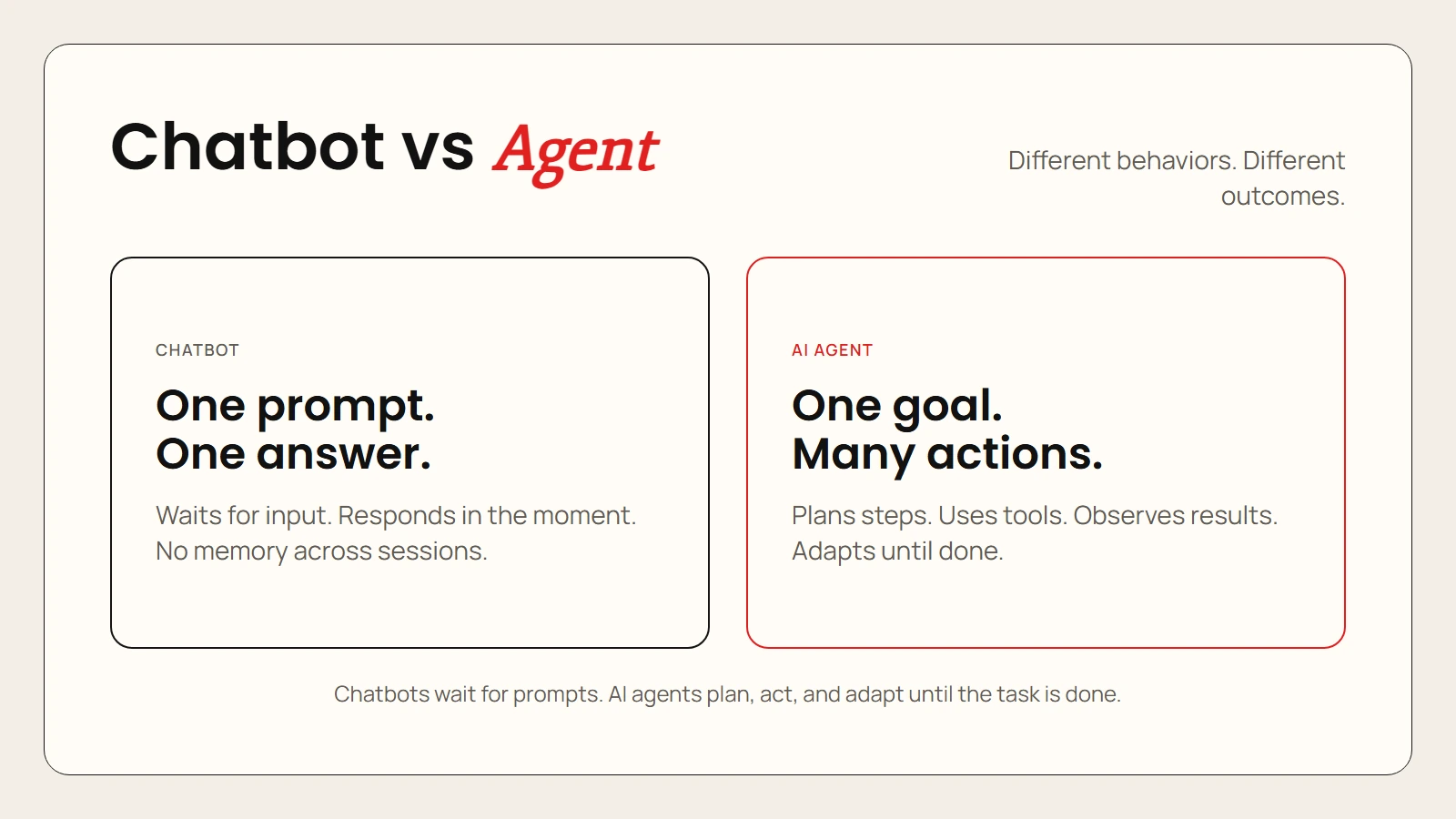
Caption: Chatbots answer one prompt at a time. AI agents pursue goals by planning, acting, and adapting on their own.
How AI Agents Work: The Plan-Act-Observe Loop
Most AI agents follow a simple but powerful cycle. Understanding this loop helps you spot agentic features in the tools you already use.
1. Plan
The agent starts by breaking your goal into smaller tasks. If you ask it to “prepare a market research report on electric bikes,” it might create a plan like this:
- Search for recent electric bike sales data.
- Identify the top five brands by market share.
- Find expert reviews and customer sentiment.
- Compile findings into a structured report.
Planning is where the agent shows its reasoning ability. A strong agent does not just guess at steps. It thinks about dependencies, such as checking if data is current before using it.
2. Act
Next, the agent carries out the first step. This usually means calling a tool. Common tools include:
- Web search to find current information.
- Code execution to calculate, scrape, or transform data.
- APIs to connect with apps like Gmail, Slack, or Google Sheets.
- File management to read documents or save results.
The agent does not have hands or a browser. It uses software interfaces to interact with the world on your behalf.
3. Observe
After acting, the agent looks at what happened. Did the search return useful results? Did the code run without errors? Did the API respond?
Observation is what makes agents adaptive. If the search results are outdated, the agent notices and tries a different query. If the code fails, it reads the error message and fixes the bug.
4. Adjust
Finally, the agent updates its plan based on what it observed. It might add a new step, skip an irrelevant one, or change its approach entirely. Then it loops back to act again.
This cycle continues until the goal is reached, a failure condition is met, or the agent hits a safety limit you set.
Key takeaway: The plan-act-observe loop is what separates agents from simple automation. A basic script follows fixed instructions. An agent rewrites its own instructions as it learns.
What Can AI Agents Actually Do?
Agentic AI sounds futuristic, but practical examples already exist. Here are real-world tasks that AI agents can handle today.
Research and Reporting
An agent can read dozens of web pages, extract key facts, and write a summary with citations. It can update that summary weekly by re-running the same search and highlighting what changed.
Software Development
Coding agents like Codex, Claude Code, and Gemini CLI can write code, run tests, debug errors, and commit changes to GitHub. You describe the feature you want, and the agent builds it iteratively.
For a practical introduction, see our guide on AI CLI tools explained.
Workflow Automation
Tools like Zapier, Make, and n8n now include AI agents that can trigger complex workflows based on incoming data. An agent might read a customer email, check your CRM, draft a personalized reply, and schedule a follow-up task.
Learn more in our guide on AI automation for beginners.
Personal Assistance
Some agents manage your calendar, book meetings across time zones, and summarize missed conversations. They can read your email, identify urgent items, and draft responses for your approval.
Content and Marketing
Marketing agents can plan a content calendar, research topics, draft blog posts, generate social media captions, and schedule publishing. They adapt based on engagement metrics from previous posts.
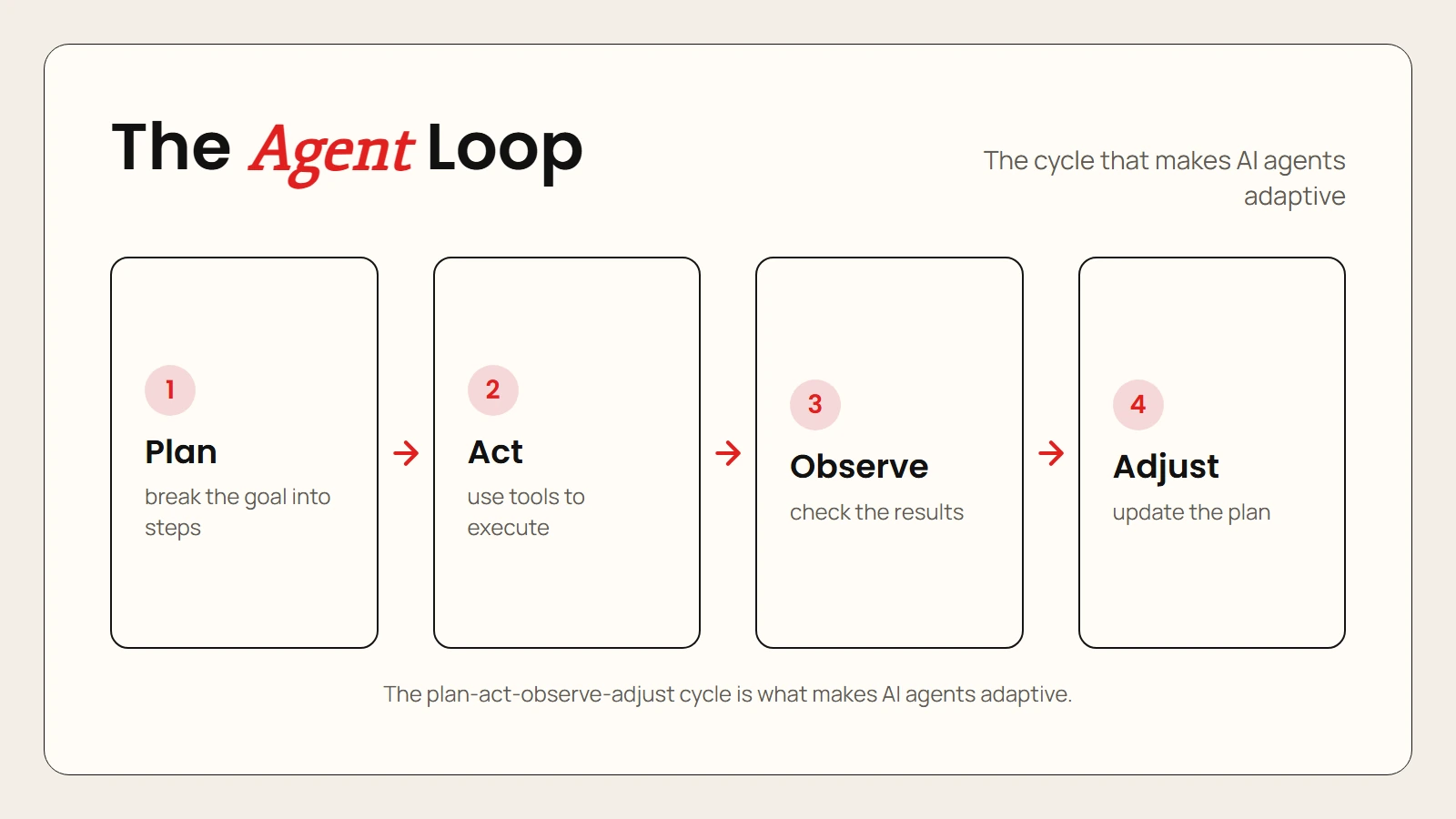
Caption: AI agents combine planning, tool use, and observation to complete multi-step tasks without constant human input.
Popular AI Agent Tools and Platforms
You do not need to build an agent from scratch. Several platforms already package agentic AI into beginner-friendly interfaces.
| Tool | Best For | Key Feature | Pricing |
|---|---|---|---|
| Claude Cowork | Knowledge work and research | Projects, tasks, and file analysis with large context | Free tier; $20/month Pro |
| ChatGPT with tools | General tasks and coding | Web browsing, code interpreter, and custom GPTs | Free tier; $20/month Plus |
| Gemini Advanced | Google ecosystem users | Workspace integration and live web data | Free tier; $20/month Advanced |
| Zapier AI | Workflow automation | No-code agent building with 7,000+ app connections | Free tier; paid from $19/month |
| n8n | Technical automation | Open-source workflow engine with AI nodes | Free self-hosted; paid cloud from $20/month |
| AutoGPT | Experimentation and coding | Fully autonomous goal pursuit with tool use | Free and open source |
| Microsoft Copilot | Office 365 power users | Agentic actions inside Word, Excel, Outlook, and Teams | Free basic; $20/month Pro |
When choosing a platform, start with the ecosystem you already use. If you live in Google Workspace, Gemini and Zapier are natural fits. If you are a developer, Claude Code or GitHub Copilot will feel more familiar.
For advice on picking the right AI assistant, see our comparison of ChatGPT vs Claude vs Gemini.
A Beginner-Friendly Workflow for Using AI Agents
Starting with agentic AI can feel overwhelming. Here is a simple workflow you can follow this week.
Step 1: Pick One Repetitive Task
Choose something you do often that follows a pattern. Good first tasks include:
- Summarizing weekly news articles on a topic.
- Formatting spreadsheet data from a standard source.
- Drafting follow-up emails after meetings.
Avoid sensitive tasks involving private data or financial decisions until you understand how the agent behaves.
Step 2: Define the Goal Clearly
Write your goal as a specific outcome, not a vague request. Compare these two prompts.
- Weak: “Help me with my emails.”
- Strong: “Read my unread emails from today, identify any meeting requests, and draft polite acceptance replies for each one.”
A clear goal gives the agent a concrete target to plan toward.
Step 3: Set Boundaries
Decide what the agent is allowed to do and what it must ask about. Common boundaries include:
- Do not send emails without my approval.
- Do not spend money or book non-refundable travel.
- Do not share data outside approved apps.
Most agent platforms let you set these guardrails in their settings or system instructions.
Step 4: Run a Supervised Test
Let the agent work through the task while you watch. Check each action before it proceeds to the next step. This teaches you how the agent thinks and where it might make mistakes.
Step 5: Review and Refine
After the test, review the results. Did the agent miss anything? Did it use unreliable sources? Did it format the output the way you wanted?
Refine your goal or boundaries based on what you learned. Then run another test. Agentic AI improves quickly with feedback.
Step 6: Gradually Increase Autonomy
Once you trust the agent on a specific task, you can reduce supervision. Start with one-click approvals instead of step-by-step review. Eventually, you may let the agent run fully autonomously for low-risk tasks.
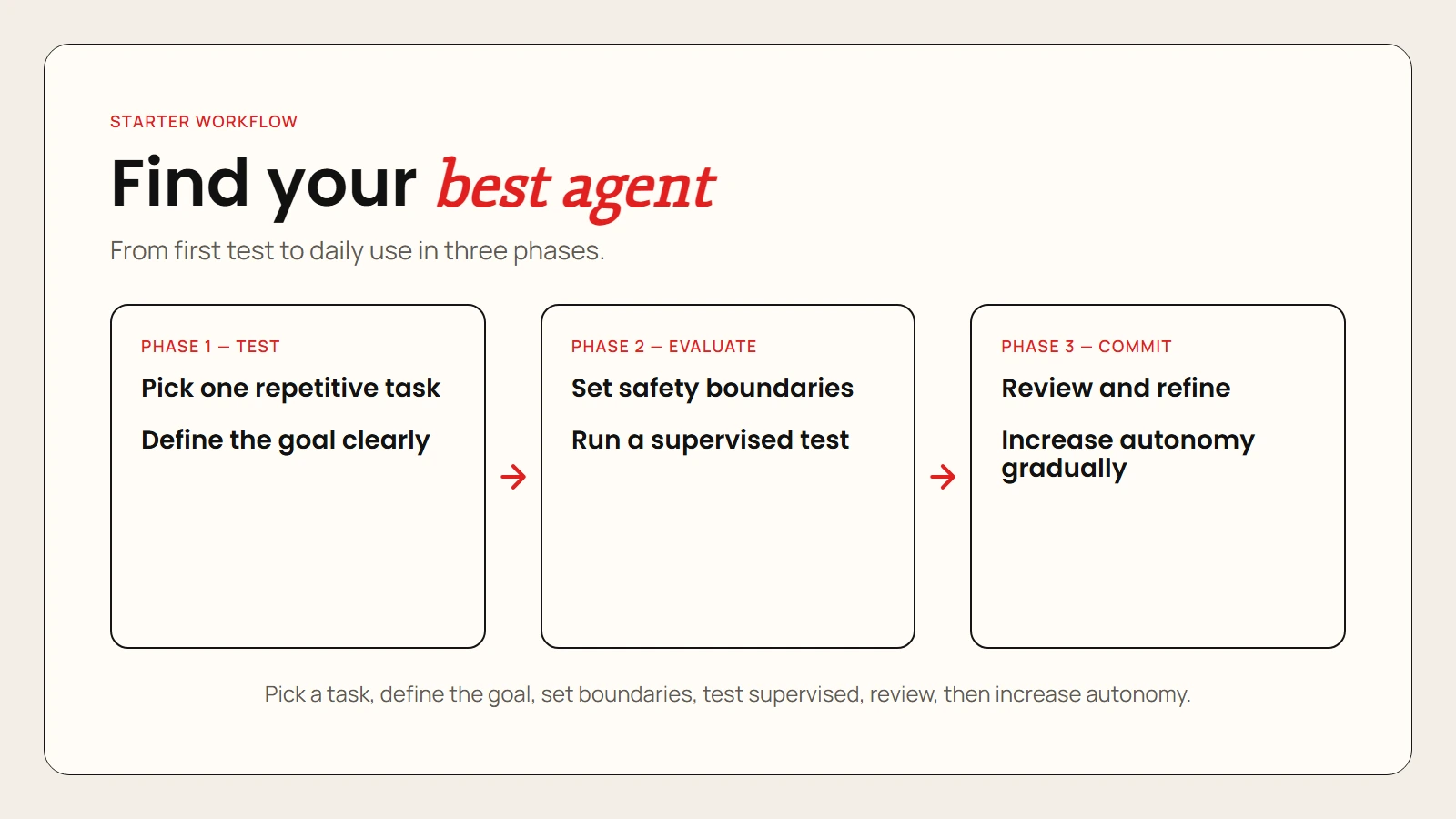
Caption: A practical 6-step workflow for testing and safely adopting AI agents in your daily work.
Common Misconceptions About AI Agents
Agentic AI is often misunderstood. Let us clear up the most common myths.
Myth 1: AI Agents Are Sentient
AI agents are not conscious. They do not have desires, beliefs, or understanding. They are software that predicts the next best action based on patterns in their training data. An agent can appear thoughtful because it plans and adapts, but it is still following statistical rules.
Myth 2: AI Agents Can Do Anything
Agents are limited by the tools you give them and the instructions you provide. If an agent has no access to your bank account, it cannot move money. If you do not give it web search, it cannot look up current events. Agents are powerful but constrained.
Myth 3: You Need to Be a Programmer
Early agents required coding skills, but that is changing fast. Platforms like Zapier, Claude Cowork, and ChatGPT now let non-technical users build agentic workflows through natural language and visual interfaces.
Myth 4: AI Agents Are Always Reliable
Agents can make mistakes, choose bad sources, or loop endlessly when stuck. They may also hallucinate, just like chatbots. Always review agent output before acting on it, especially for high-stakes decisions.
For more on accuracy and verification, read our guide on are AI tools accurate.
Safety and Ethics: What to Watch For
Giving an AI agent autonomy means giving it power. Here are the key risks and how to manage them.
Data Privacy
Agents often need access to your email, calendar, documents, or accounts. Before connecting anything, check the platform’s privacy policy. Ask these questions:
- Does the AI train on my data?
- Can I delete my conversation history?
- Is there an enterprise plan with stronger privacy controls?
Hallucination and Error Propagation
When an agent works across multiple steps, a small error early on can compound into a big mistake later. For example, if the agent misreads a date in step one, every subsequent step might be wrong. Build review checkpoints into long workflows.
Over-Autonomy
It is tempting to let agents run unsupervised once they work well. Resist this for critical tasks. Keep a human-in-the-loop for financial transactions, legal decisions, medical advice, and anything that affects other people.
Transparency
Good agent platforms show you what the agent is doing and why. If a tool acts like a black box, be cautious. You should always be able to see the plan, the actions taken, and the reasoning behind them.
FAQ
What are AI agents in simple terms?
AI agents are software systems that pursue goals on their own. Unlike chatbots, which wait for your next question, agents plan tasks, use tools, observe results, and keep working until the job is done.
How do AI agents differ from chatbots?
Chatbots respond to individual prompts. AI agents take a high-level goal, break it into steps, and execute those steps using tools like web search, code execution, and APIs. They also adapt when something goes wrong.
Do I need coding skills to use AI agents?
No. Many modern agent platforms offer no-code or low-code interfaces. You can describe what you want in plain English, and the platform handles the technical setup.
What are some examples of AI agents?
Examples include Claude Cowork for research tasks, Zapier AI for workflow automation, AutoGPT for autonomous coding experiments, and Microsoft Copilot for agentic actions inside Office apps.
Are AI agents safe to use?
They can be safe if you set clear boundaries, review their actions, and avoid giving them access to sensitive accounts without safeguards. Always start with supervised tests on low-risk tasks.
Can AI agents replace human workers?
AI agents are better thought of as coworkers than replacements. They excel at repetitive, structured tasks but still need human judgment for strategy, creativity, ethics, and complex decision making.
What is agentic AI?
Agentic AI is the broader field of AI systems that act autonomously to achieve goals. It includes the models, tools, and frameworks that enable AI agents to plan, reason, and interact with the world.
Which AI agent tool should I start with?
Start with the tool that fits your existing workflow. If you use Google Workspace, try Gemini Advanced. If you want workflow automation, try Zapier. If you do knowledge work, try Claude Cowork. If you code, try Claude Code or GitHub Copilot.