
What Are AI Tokens? Context Windows, Costs, and How to Save Tokens
AI tokens are the small pieces of text an AI model reads and writes. They are the unit that affects three things beginners usually care about most: how much fits into a prompt, how much a request costs, and how quickly a long chat starts getting worse instead of better.
If you understand tokens, context windows, and context rot, you stop treating AI costs like a mystery. You start treating them like workflow design. That matters whether you use ChatGPT, Claude, Gemini, Grok, or an API-powered tool that sits on top of them.
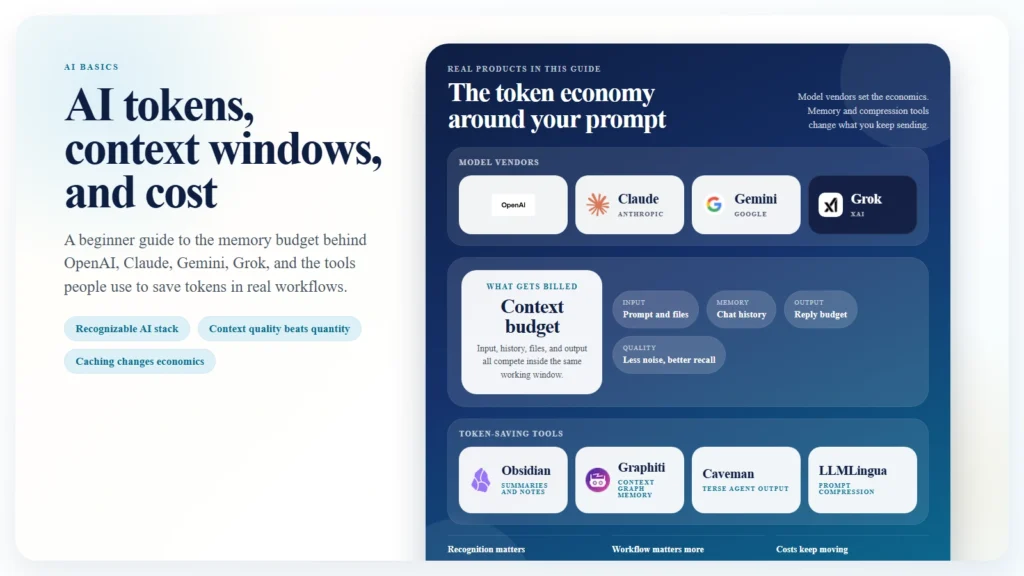
This guide explains the basics in plain English, then shows practical ways to save tokens in real work. It also points to tools and repos worth watching, including Obsidian-style note workflows, Graphiti for agent memory, Caveman for terse outputs, and LLMLingua for prompt compression.
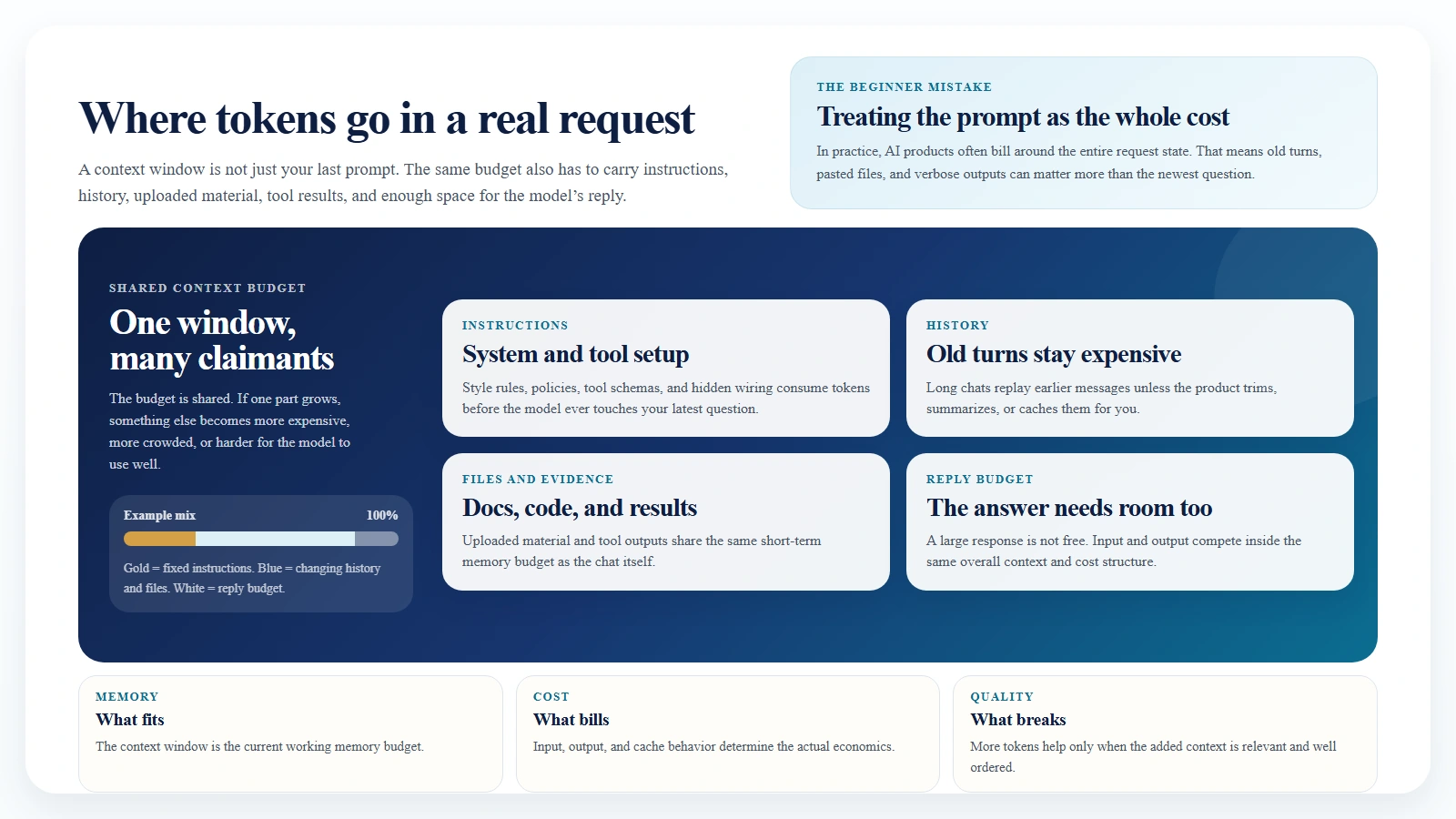
Caption: A context window is shared by everything in the request, not just the last prompt.
Key Takeaways
- AI models do not read words the way humans do. They read and write tokens.
- A context window is the total amount of tokens the model can handle in one turn, including instructions, chat history, tool schemas, files, and the model’s reply.
- Bigger context windows help, but they do not remove the need to manage relevance. More context can still produce worse answers.
- “Context rot” is an informal term for long conversations degrading because too much stale, irrelevant, or badly ordered context stays in the prompt.
- Token cost is usually driven by input tokens, output tokens, and whether repeated context can be cached cheaply.
- The biggest savings usually come from workflow changes, not clever prompting tricks.
Table of Contents
- What are AI tokens?
- What is a context window?
- What is context rot?
- How token costs work
- Who tracks benchmark cost across OpenAI, Claude, Gemini, and Grok?
- The most useful skills for saving tokens
- Real-world ways to save tokens
- Repos and tools worth watching
- FAQ
What Are AI Tokens?
Tokens are the chunks a language model uses to process text. A token is not always a whole word. It might be:
- a short word
- part of a longer word
- punctuation
- whitespace patterns
- pieces of code
That is why “100 words” and “100 tokens” are not the same thing.
As a rough beginner rule, one token is often around 4 characters of English text on average, but that estimate breaks down fast once you switch languages, include code, use tables, or pass structured data. A JSON blob, stack trace, or TypeScript file can burn through tokens much faster than plain prose.
This is also why AI bills can feel surprising. You may think you sent “just a few paragraphs,” but the model may have counted:
- your system instructions
- the full chat history
- hidden tool definitions
- pasted docs
- code blocks
- your actual question
- the model’s answer
All of that is tokenized.
The simple mental model is this:
Tokens are the unit of memory and the unit of billing.
If you want to understand AI usage, you need to think in tokens, not just words.
What Is a Context Window?
A context window is the total number of tokens a model can handle in a single interaction. The easiest analogy is short-term memory. It is the space the model uses to hold the current conversation, instructions, and working materials before it produces the next answer.
What counts against that window usually includes:
- system prompts
- user prompts
- earlier turns in the conversation
- uploaded file contents
- tool schemas and tool results
- the output budget for the model’s reply
That last point matters. The context window is not only for what you send in. It also has to leave room for what the model sends back.
As of April 12, 2026, providers frame long context differently:
- Anthropic documents that Claude Sonnet 4.6 and Claude Opus 4.6 include the full 1 million token context window at standard pricing.
- Google documents that many Gemini models support 1 million or more tokens, and its long-context guide frames Gemini as built around 1M-token workflows.
- OpenAI’s pricing page for GPT-5.4 explicitly notes that its listed standard rates apply to context lengths under 270K, which is a useful reminder that long-context pricing thresholds matter even when a model is very capable.
The important beginner lesson is that a bigger context window is not the same thing as a better answer.
A large window gives you more room. It does not guarantee that:
- the model will attend to the right detail
- the most relevant information is well placed
- stale instructions will stop interfering
- your cost stays reasonable
Large context solves one problem. It does not solve prompt quality, retrieval quality, or workflow design.
What Is Context Rot?
“Context rot” is an informal phrase people use when a long chat or overloaded prompt starts getting worse over time. The model still has plenty of tokens available, but the quality drops because the context has become noisy, stale, contradictory, or poorly organized.
In plain language, context rot usually looks like this:
- the model keeps following an old instruction instead of the newest one
- a useful detail gets buried in the middle of a huge prompt
- irrelevant background keeps being replayed into every turn
- the model mixes old and new assumptions together
- cost rises faster than answer quality
The formal research language is a bit different, but the underlying behavior is real. The paper Lost in the Middle found that long-context models often perform best when the needed information is near the beginning or the end of the prompt, and worse when the relevant material sits in the middle. Google’s long-context guide makes a similar practical point: long-context performance can vary widely when you need to retrieve multiple specific facts from a large context.
That is why “just paste everything” is not a durable strategy.
Context rot does not mean long context is fake. It means that long context still needs structure.
The best way to think about it is this:
- context window = how much can fit
- context quality = how useful that material is
- context rot = what happens when too much low-value material keeps fitting
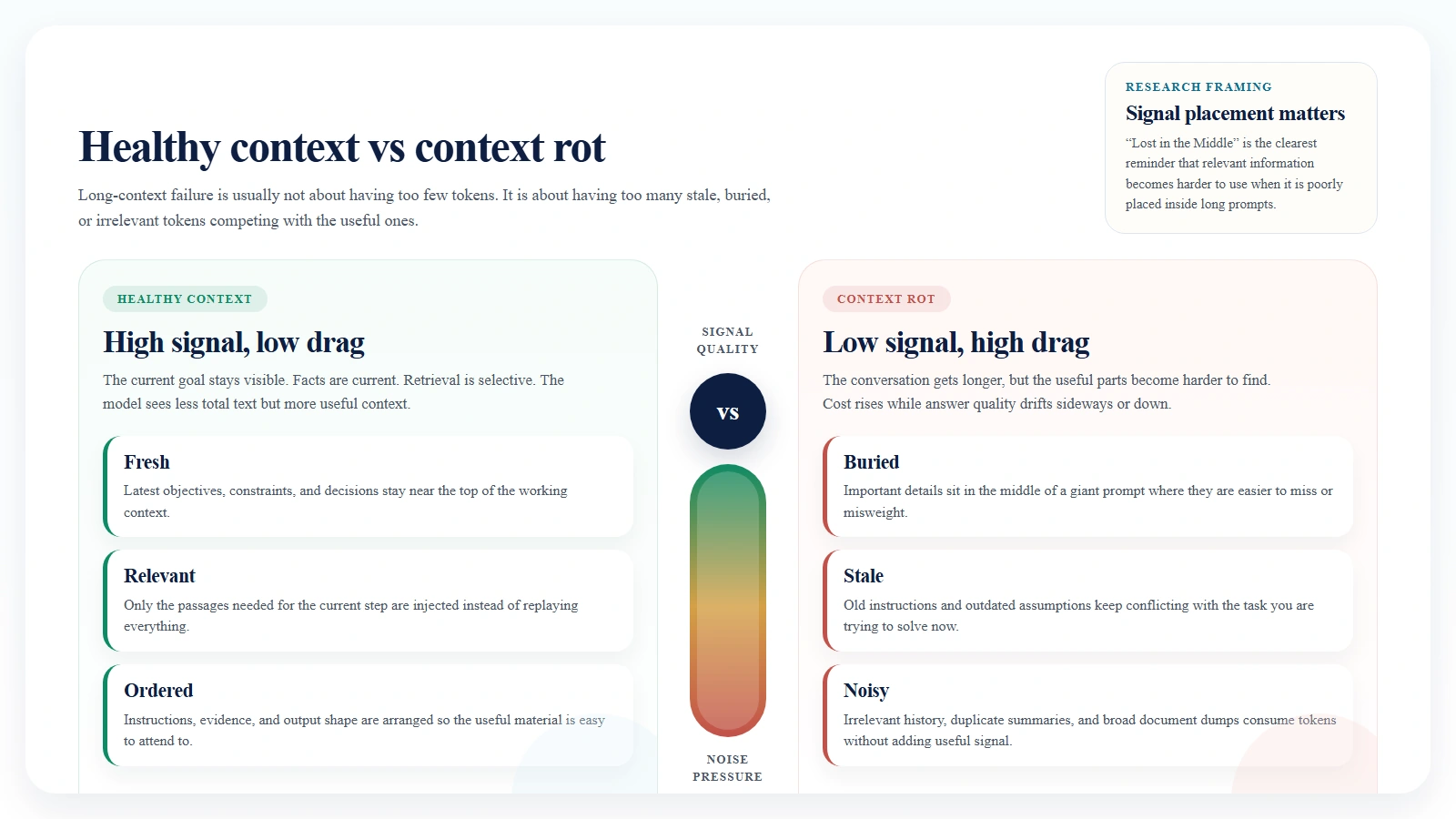
Caption: More tokens only help when they are relevant, current, and well ordered.
How Token Costs Work
Most major AI products charge for tokens in a few categories:
- input tokens
- output tokens
- cached input or cache hits
- sometimes tool usage, search usage, storage, or batch pricing
The basic formula is simple:
total cost = input token cost + output token cost + tool or storage extras
Here is the practical beginner version:
- input tokens are what you send
- output tokens are what the model generates
- repeated context can often be cached much more cheaply than resending it raw
- very long prompts can cross into different pricing bands
As of April 12, 2026, official pricing pages show this rough picture:
| Model | Input price | Output price | Repeated-context note | Important context note |
|---|---|---|---|---|
| OpenAI GPT-5.4 | $2.50 / 1M | $15.00 / 1M | Cached input $0.25 / 1M | Pricing page says listed rates are standard for context under 270K |
| Claude Sonnet 4.6 | $3 / 1M | $15 / 1M | Cache hits $0.30 / 1M | Anthropic says 1M context is standard priced on Sonnet 4.6 |
| Gemini 2.5 Pro | $1.25 / 1M for prompts up to 200K, $2.50 above 200K | $10 / 1M up to 200K, $15 above 200K | Context caching $0.125 / 1M up to 200K | Strong model, but long prompts can cost more |
| Gemini 2.5 Flash | $0.30 / 1M | $2.50 / 1M | Context caching $0.03 / 1M | Google documents 1M-token support and cheaper high-volume use |
Two patterns should stand out immediately.
First, output tokens are often much more expensive than input tokens. That means a verbose answer can cost more than the prompt that produced it.
Second, caching can radically change economics when you reuse the same large context repeatedly.
A simple cost example
Suppose you send:
- 50,000 input tokens
- 5,000 output tokens
That would cost roughly:
- GPT-5.4: $0.125 input + $0.075 output = $0.20
- Claude Sonnet 4.6: $0.15 input + $0.075 output = $0.225
- Gemini 2.5 Pro at the lower prompt tier: $0.0625 input + $0.05 output = $0.1125
- Gemini 2.5 Flash: $0.015 input + $0.0125 output = $0.0275
Now imagine that the 50,000-token input is mostly repeated context.
If that repeated input can be cached, your next request can be dramatically cheaper:
- OpenAI cached input would turn the repeated 50K portion from about $0.125 into about $0.0125
- Anthropic cache-hit pricing would turn the repeated 50K portion from about $0.15 into about $0.015
- Gemini 2.5 Flash context caching would turn the repeated 50K portion from about $0.015 into about $0.0015
That is why serious token saving is mostly about not resending the same context in full.
Who Tracks Benchmark Cost Across OpenAI, Claude, Gemini, and Grok?
Official vendor pricing pages are still the source of truth for billing. If you want to know what OpenAI, Anthropic, Google, or xAI will charge you directly, use their pricing docs first.
But if you want to compare cost relative to benchmarked quality across vendors, the clearest independent source right now is Artificial Analysis.
That matters because beginners often ask the wrong pricing question. They ask:
Which model is cheapest per token?
The better question is:
Which model gives me the best performance for the workload I actually care about?
Artificial Analysis tries to answer that by combining benchmark performance, speed, and price. Its “Cost to Run Artificial Analysis Intelligence Index” is based on each model’s input and output token pricing plus the tokens consumed across its evaluation set.
As of April 12, 2026, its homepage price snapshot shows a useful blended comparison:
- Gemini 3 Flash around 1.1 USD per 1M tokens
- Grok 4.20 0309 v2 around 3 USD per 1M tokens
- Gemini 3.1 Pro Preview around 4.5 USD per 1M tokens
- GPT-5.4 (xhigh) around 5.6 USD per 1M tokens
- Claude Sonnet 4.6 (max) around 6 USD per 1M tokens
That does not mean those numbers replace official billing docs. It means they are useful for a cross-vendor, benchmark-aware view of cost.
If you specifically want OpenAI, Claude, Gemini, and Grok in one place, that kind of independent tracker is more useful than reading four pricing pages in isolation.
The right way to use these sources is:
- Use official pricing pages to understand direct billing.
- Use benchmark trackers like Artificial Analysis to compare cost against measured quality.
- Use your own logs to see whether your workflow actually matches those benchmark assumptions.
The Most Useful Skills for Saving Tokens
Most token-saving advice online is too tactical. It focuses on prompt phrasing. The bigger wins usually come from skills and habits.
Here are the ones that matter most.
1. Ask for deltas, not rewrites
Do not ask the model to rewrite an entire document if you only need one section fixed.
Better:
- “Rewrite the introduction only.”
- “Return only the changed paragraph.”
- “Give me a diff, not a full replacement.”
This cuts both input and output tokens.
2. Keep a rolling summary
Long conversations decay. Instead of carrying the full thread forever, stop periodically and write a short checkpoint summary:
- current objective
- decisions made
- constraints
- unresolved questions
Then continue from the summary instead of the whole raw history.
3. Cache stable context
If you repeatedly use the same style guide, codebase instructions, product FAQ, or research pack, do not resend it from scratch every time if your platform supports prompt or context caching.
This is one of the highest-leverage cost skills in production workflows.
4. Separate memory from chat
Chat history is a bad long-term memory system. It bloats quickly and becomes noisy.
A better pattern is:
- store durable knowledge outside the chat
- retrieve only the relevant slice
- inject that slice when needed
This is where note systems, vector search, and context graphs become valuable.
5. Use smaller models for triage
Do not spend premium-model tokens on every step.
A practical pattern is:
- cheap model for classification, routing, tagging, extraction, or summarization
- strong model only for final synthesis, reasoning, or high-risk output
This matters more than shaving a few words off a prompt.
6. Constrain output shape
If you want five bullets, say five bullets.
If you want JSON, say JSON.
If you want a short answer, say “answer in 120 words max.”
Verbose output is one of the easiest ways to waste tokens.
7. Retrieve, do not replay
If the current question is about section 3 of a document, retrieve section 3 plus a little adjacent context. Do not paste the full document every time.
This reduces cost and lowers the chance of context rot.
8. Learn when not to include background
Beginners often think more context is always safer. It is not.
Useful context is specific, relevant, current, and well ordered.
The rest is just expensive noise.
Real-World Ways to Save Tokens
The best way to understand token saving is through actual workflows.
Obsidian: keep knowledge in notes, not in the prompt
Obsidian is useful here not because it magically reduces tokens, but because it encourages a better knowledge shape.
A strong low-token workflow looks like this:
- Keep project notes in short atomic files.
- Maintain one clean summary note per project.
- Store decision logs and definitions separately.
- Paste only the note that matters for the current task.
Instead of sending:
- six old chats
- a 20-page brainstorm
- three duplicate summaries
you send:
- the current task
- the project summary note
- the one relevant source note
That is often the difference between a clean 5K-10K token prompt and a chaotic 60K token prompt.
Graphiti: retrieve facts instead of replaying raw history
Graphiti takes a more structured approach. It builds a temporal context graph for agents, so the system can retrieve relevant facts and relationships instead of replaying a giant chat log or a flat bundle of document chunks.
That matters because not every token is equal. Ten precise facts are usually more useful than 20 pages of undifferentiated history.
Graphiti is not a “prompt compression” tool in the narrow sense. It is a context selection tool. In practice, that can save more tokens than blunt compression because it cuts irrelevant context before it ever reaches the model.
Repeated document Q&A: cache the document
If users ask multiple questions about the same document pack, do not resend the pack from scratch on each turn.
A better pattern is:
- upload or cache the documents once
- store the repeated context
- send only the new question each turn
This is exactly the kind of workflow Google highlights in its Gemini long-context guidance, and it is where cached context can change the economics dramatically.
Coding workflows: make the model speak shorter
One practical community example is JuliusBrussee/caveman. It is a plugin or skill layer for coding agents that pushes the assistant toward terse, stripped-down answers. The repo claims large output-token savings and also includes a caveman-compress tool for shrinking session memory files.
That is useful because output tokens are often expensive. If the model keeps writing paragraphs where three lines would do, you are paying for fluff.
The caveat is important: Caveman-style output compression mainly reduces spoken output, not hidden reasoning tokens. It is best understood as a readability and verbosity control that can also save money.
RAG and research pipelines: compress before you send
Microsoft’s LLMLingua is one of the best-known repos in this space. Its prompt-compression work is built specifically around getting more useful information into fewer tokens. The README links to LLMLingua, LongLLMLingua, and LLMLingua-2, with examples around RAG, meetings, code, and chain-of-thought style workflows.
This is especially relevant when:
- retrieved passages are long and repetitive
- the same document style appears over and over
- middle-of-prompt relevance starts degrading
- you need lower cost without rewriting the whole application stack
LongLLMLingua is especially notable because it explicitly connects prompt compression with the “lost in the middle” problem in long-context settings.
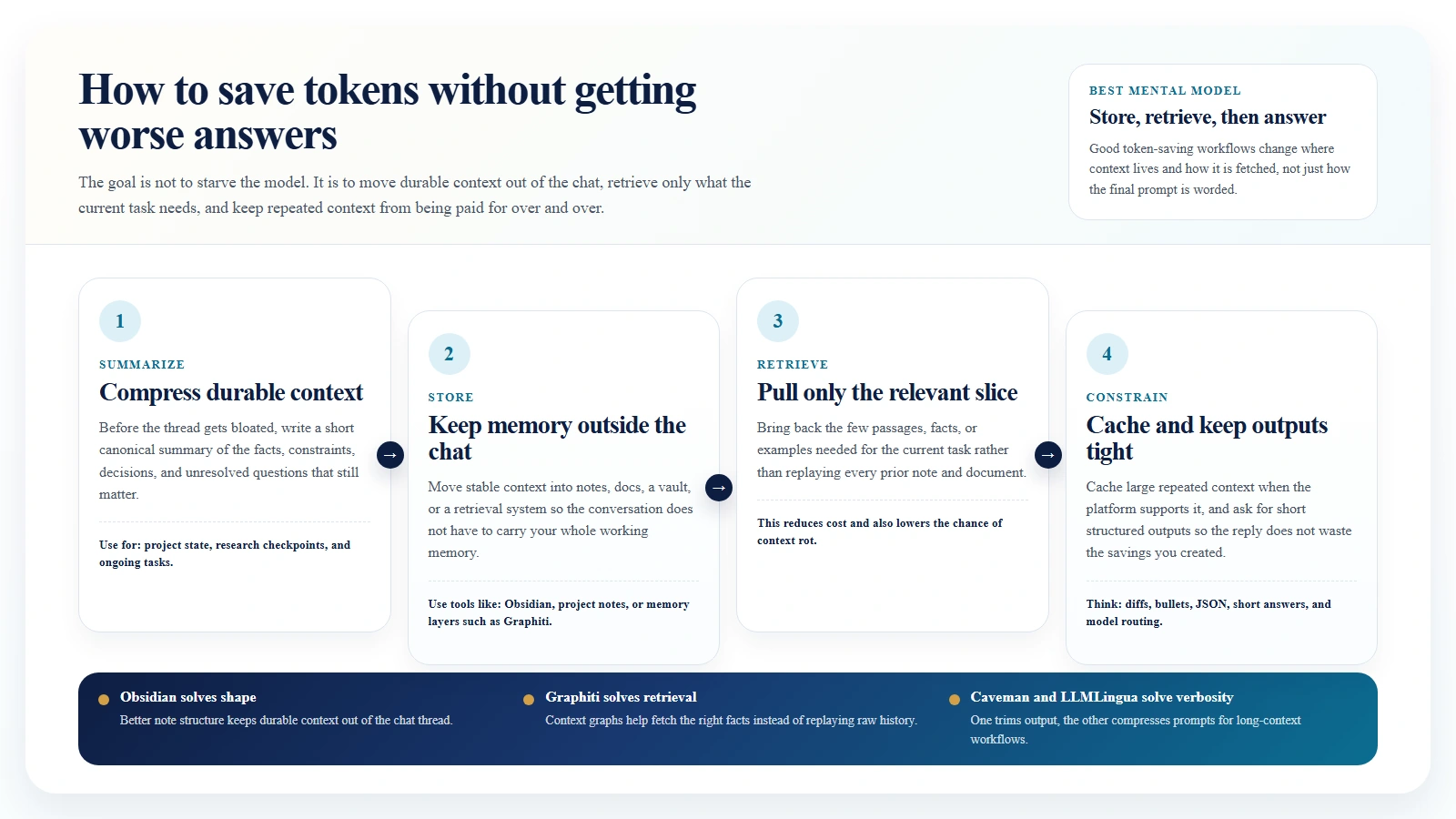
Caption: Store durable knowledge outside chat, retrieve only what the current task needs, and keep outputs tight.
Repos and Tools Worth Watching
If your goal is token efficiency, these are worth knowing:
- JuliusBrussee/caveman: useful when you want shorter agent responses and less session bloat.
- microsoft/LLMLingua: useful when you need serious prompt compression for long-context or RAG workflows.
- getzep/graphiti: useful when the real problem is bad memory structure rather than raw token count.
- Obsidian: useful when you want a low-tech, low-cost personal knowledge workflow that keeps durable context outside the chat.
They solve different problems:
- Caveman reduces verbosity.
- LLMLingua compresses prompts.
- Graphiti improves retrieval and memory shape.
- Obsidian helps humans manage context before it becomes token waste.
That distinction matters. If you use the wrong fix for the wrong problem, you may reduce token count without improving results.
A Simple Token-Saving Playbook
If you only remember one workflow, use this one:
- Start each project with a short canonical summary.
- Keep reference material outside the chat.
- Retrieve only what the current task needs.
- Cache repeated context when the platform supports it.
- Ask for short, structured outputs.
- Refresh the conversation with a checkpoint summary before it gets bloated.
- Use stronger models only where stronger reasoning actually matters.
This will save more tokens than most “prompt hacks.”
FAQ
Are tokens the same thing as words?
No. Tokens are smaller processing units. A word can be one token, several tokens, or sometimes part of a token pattern depending on the tokenizer and the language.
Does a bigger context window always mean better answers?
No. A bigger window means more can fit. It does not mean the model will use that information well. Ordering, relevance, and retrieval still matter.
Is context rot an official technical term?
Not really. It is mostly community shorthand. But the underlying behavior is real, and long-context research clearly shows that retrieval quality can degrade as prompts grow and relevant details become badly placed or diluted.
What is the fastest way to cut AI costs?
Usually:
- stop resending the same context
- constrain output length
- use caching
- split cheap steps from expensive steps
Should I buy a bigger plan or redesign my workflow?
Usually redesign the workflow first. If the workflow is bloated, a larger context window just gives you a larger and more expensive mess.
Suggested Internal Link Opportunities
- /blog/what-is-ai-fluency-and-why-it-matters
- /blog/how-to-start-using-ai-as-a-complete-beginner
- /blog/ai-cli-tools-explained-codex-claude-code-gemini-cli
- /blog/how-to-use-hugging-face-as-a-beginner
- /blog/how-to-review-ai-output-before-you-trust-it
- /blog/how-to-use-ai-for-research-without-losing-accuracy